
TL;DR
Moving your rig into another room, especially a closet, drastically reduces noise and heat issues. Proper placement, ventilation, and basic dampening are key to a quiet, cool setup. The ‘rig in the closet’ is a smart, cost-effective solution—if you manage airflow and temperature well.
Ever been annoyed by the relentless roar of your AI workstation? Or frustrated that no amount of foam panels makes a difference because the noise just leaks out? The truth is, the best way to silence your rig isn’t just soundproofing — it’s about moving it away entirely. When your machine lives in another room or a closet, the noise doesn’t bother you anymore.
This article reveals how placement, dampening, and clever use of closet space can turn your noisy, hot rig into a silent, cool powerhouse. Whether you’re building a dedicated AI server or just trying to keep your home office peaceful, understanding these tricks will save you headaches and noise complaints.
Acoustic dampening
& the rig in the closet.
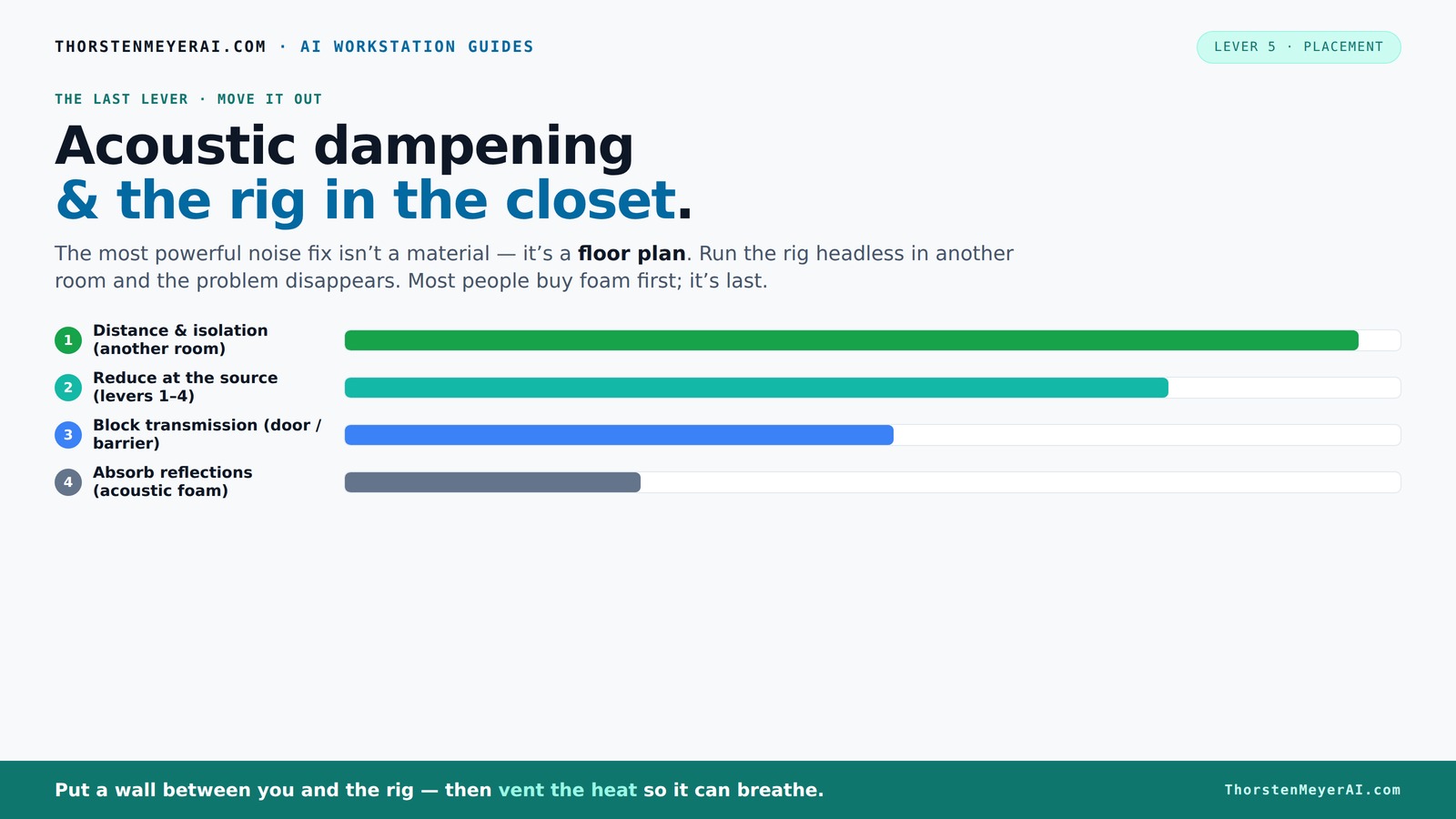
The most powerful noise fix isn’t a material — it’s a floor plan. A rig you can’t hear because it’s in another room beats any amount of foam. Tap the approaches in Part 1 to see what actually works.
(another room)
(levers 1–4)
(door / barrier)
(acoustic foam)
Contain the noise, not the heat
Key Takeaways
- The most effective noise reduction is moving your rig into another room or closet, not just adding foam panels.
- A sealed closet traps heat, so active ventilation is a must for a 'rig in the closet' setup.
- Use rubber feet and anti-vibration mounts to cut structure-borne hums and vibrations.
- Combining physical dampening with digital room correction yields the best sound quality.
- Prioritize airflow and cooling to prevent thermal throttling in enclosed spaces.
soundproof server closet enclosure
As an affiliate, we earn on qualifying purchases.
As an affiliate, we earn on qualifying purchases.
Why Moving Your Rig Is the #1 Noise Solution You Overlook
Ever notice how a room full of fans sounds like a jet engine? Moving your rig into another room, especially a closet or basement, cuts out nearly all the noise at the source. This isn't just about muffling — it’s about **eliminating** the problem.
By relocating your machine, you're essentially removing the primary noise source from your immediate environment, which drastically improves your comfort and concentration. But this move isn't just about silence; it also has implications for heat management and accessibility. If your rig is in another room, you'll need reliable wired or wireless connections, and you'll want to consider how to maintain proper airflow in the new space. The tradeoff? Less noise but added complexity in setup and potential latency concerns if network connections aren't optimal.
As an affiliate, we earn on qualifying purchases.
The 'Rig in the Closet' Setup: How It Works and the One Big Catch
Placing your noisy, heat-generating machine inside a closet or cabinet is a clever way to cut noise. Clothing, foam, and soft materials naturally dampen sound, turning the closet into a makeshift vocal booth. But here’s the catch: heat builds up fast, and if not managed properly, it can cause your hardware to throttle or even overheat.
This setup works because sound waves are absorbed and reflected inside soft, dense materials, which reduces the noise escaping into your room. However, the tradeoff is that these materials do little to dissipate heat. Without adequate ventilation, the enclosed space traps hot air, raising internal temperatures and risking thermal throttling — where your hardware reduces performance to prevent damage. The implication? You must design a ventilation system that balances noise reduction with effective cooling. Otherwise, you risk damaging your equipment or experiencing performance drops. For example, a GPU running at high load can generate enough heat to raise the ambient temperature in a closed closet by 15-20°C in just an hour, which can cause throttling or hardware failure. The key is to incorporate active airflow solutions, such as exhaust fans, or use specially designed soundproof cabinets with built-in cooling. These tradeoffs highlight that a 'rig in the closet' isn't just about putting everything inside; it's about engineering an environment that manages both sound and heat effectively.
acoustic dampening foam panels for computers
As an affiliate, we earn on qualifying purchases.
As an affiliate, we earn on qualifying purchases.
How to Ventilate a Closet Rig Without Losing Silence
Good news: you don’t have to choose between silence and cooling. Here’s a quick step-by-step:
- Install a quiet exhaust fan with a thermostat control — something like a low-noise duct fan. This ensures hot air is expelled without creating additional noise.
- Create passive vents or ducting that allows air to flow in and out, avoiding hot air buildup. Proper placement of vents ensures efficient airflow, which is critical for preventing heat accumulation.
- Use flexible, insulated ducting to direct hot air outside or into a basement, preventing heat recirculation inside the closet.
- Place soundproofing foam around the exhaust port to muffle any escaping noise. This reduces the chance of the ventilation system becoming a noise source itself.
This setup keeps your rig cool without turning your closet into a noise emitter. Think of it as a mini data center with silent exhausts. The tradeoff here involves balancing the size and power of your ventilation system — too small, and heat builds up; too large, and noise may leak despite soundproofing. Properly designed, this method ensures your system remains both quiet and cool, maximizing performance without sacrificing comfort.
computer noise isolation enclosure
As an affiliate, we earn on qualifying purchases.
As an affiliate, we earn on qualifying purchases.
Acoustic Dampening in a Small Space: What Really Works
Acoustic foam and panels are popular, but their real power lies in controlling reflections inside a space, not blocking noise transmission. For your closet rig, focus on:
- Line the interior with thick, dense foam to reduce echo and muffling sound inside. This prevents internal reverberations that can amplify the perceived loudness, making the noise less distracting during operation.
- Place bass traps in corners to tame low-frequency rumble, especially if your rig vibrates or hums. Low frequencies tend to leak through walls and materials more easily, so trapping them reduces overall noise pollution.
- Seal gaps around doors or panels to prevent sound leaks. Even small cracks can let out significant noise, defeating the purpose of dampening inside.
For example, a closet lined with acoustic panels and bass traps can significantly decrease echo and internal reverberation, making the noise softer and less distracting. However, it’s important to understand that foam and soft materials mainly improve internal acoustics; they don't prevent sound from escaping the enclosure. To truly reduce noise leakage, combine internal dampening with sealing the door or vents with soundproofing materials. This layered approach ensures that the noise stays contained and your environment remains peaceful.
Comparison: Foam Absorption vs. Sound Barriers — Which Do You Need?
| Feature | Foam Absorbers | Sound Barriers |
|---|---|---|
| Purpose | Reduce echoes and reflections inside a room | Stop sound from passing through walls or doors |
| Effectiveness | Less effective at blocking noise leakage but excellent at improving internal acoustics | Highly effective at containing sound, preventing it from escaping |
| Best use case | Improving room acoustics, reducing echo and internal reverberation | Preventing sound from leaving or entering a space, especially in shared environments |
| Cost | Moderate | Higher, especially for professional-grade barriers |
In your closet setup, combine both: foam for inside dampening and a solid barrier for sealing the door or vents. This layered approach optimizes both internal acoustics and external containment, ensuring your noise remains inside where it belongs and doesn’t disturb others.
Practical Tips for Setting Up a Quiet, Cool Closet Rig
Want a quick checklist? Here’s what works:
- Use rubber feet or anti-vibration pads under your tower to cut structure-borne noise, which is often overlooked but can significantly contribute to perceived loudness.
- Install a quiet, thermostatically controlled exhaust fan for cooling that doesn’t generate excess noise.
- Line the interior with acoustic foam to dampen internal reflections, which reduces internal noise amplification.
- Seal gaps around doors and vents with weatherstripping or acoustic caulk to prevent sound leaks.
- Ensure the space has good airflow — hot air must escape, cool air must enter. Proper airflow not only prevents heat buildup but also helps maintain stable operating temperatures, which is critical for hardware longevity.
- Keep an eye on temperatures with a simple thermometer or smart sensor to adjust ventilation as needed.
For detailed airflow and cooling setups, check out [this article](https://thorstenmeyerai.com/reduce-heat-noise-ai-workstation/).
Frequently Asked Questions
Is it safe to put a high-performance rig in a closet?
Yes, if you provide proper ventilation and temperature control. Active exhaust fans and ducting prevent heat buildup, protecting your hardware from thermal damage.How do I keep my closet rig quiet without sacrificing cooling?
Use quiet, thermostatically controlled exhaust fans, insulation, and soundproof vents. Combining these with rubber mounts and foam dampening inside the closet keeps noise low while maintaining airflow.Can I DIY my own acoustic dampening for a closet setup?
Absolutely. Use thick foam or mineral wool lining, seal gaps with weatherstripping, and add rubber feet. Combine these with a simple exhaust setup, and you’ll have a cost-effective, quiet solution.What’s the biggest mistake people make when placing a rig in a closet?
Ignoring ventilation. Trapped heat causes throttling and hardware issues. Always ensure hot air can escape and cool air can circulate.How much does a good soundproof closet setup cost?
A basic DIY setup with foam, rubber mounts, and a duct fan can start around $200. Professional soundproof cabinets with active cooling can run into thousands but are highly effective for continuous, demanding workloads.Conclusion
Thinking of putting your rig in a closet? Do it — but with a plan. Proper ventilation and damping turn a noisy, hot machine into a quiet, efficient workhorse. The quietest setup isn’t just about foam; it’s about smart placement, airflow, and a little engineering finesse.
Imagine your workspace free of that constant hum, your focus sharper, your stress lower. That’s the power of good placement and cooling — turning chaos into calm, heat into cool, noise into silence.